What it does
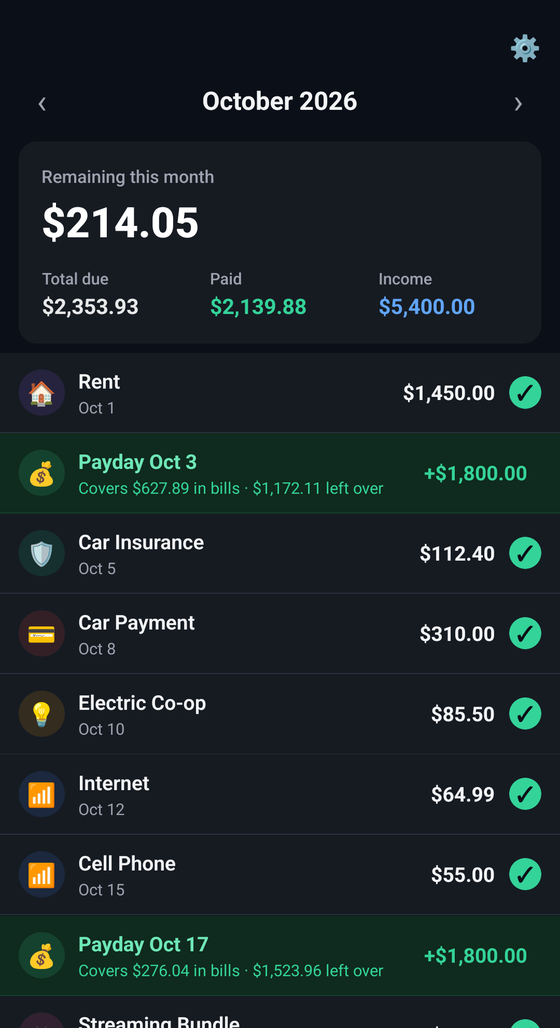
A clear picture of what's due, what's paid, and what's left — every month.
Features
Everything you need to stay on top of your bills, nothing you don't.
Recurring bills
Add bills once with a due day and category, and they roll forward every month automatically.
Mark as paid
Tap a bill to mark it paid for the month and watch your remaining balance update instantly.
Monthly summary
See total due, total paid, and what's left at a glance, broken down by month.
Loan tracking
Add interest rate, remaining balance, and lender to any loan or debt, and see an estimated payoff timeline.
Bill due reminders
Get a local notification the day each bill is due, with a reminder time you control. No push service, no server round-trip.
Multi-currency
Choose the currency that matches your budget from the settings panel.
Export & import
Download your data as a JSON file anytime, and restore it on a new device or after reinstalling.
Private by design
Everything is stored locally on your device. No account, no server, no tracking.
iOS & Android
Built with React Native so it runs natively on both platforms from one codebase.
Get started
Clone it, install it, run it — three steps and you're in.
- Clone the repository and install dependencies
git clone https://github.com/JoeyHissong/BudgetTracker.git
cd BudgetTracker
npm install
- Start Metro, then run the app on your platform of choice
npm start
# in a separate terminal
npm run ios      # or
npm run android
- See the README for environment setup details.